Introduction
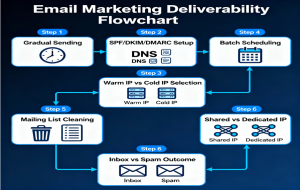
When you send an email, it does not go directly to the recipient’s inbox.
It must first pass through several verification and filtering layers before the recipient’s mail server accepts it for delivery.
Leading email providers such as Gmail, Yahoo, Outlook (Microsoft), Zoho Mail, and others like AOL, iCloud, Proton Mail, Mail.com, GMX, Yandex, and Tutanota (Tuta) enforce strict acceptance criteria to protect users and maintain global email hygiene.
Understanding these acceptance checks helps system administrators, developers, and marketers ensure that their outbound email systems are authenticated, compliant, and optimized for reliable inbox delivery.
This guide explains how mail servers decide whether to accept or reject a message, the authentication standards they use, and the technical and security requirements that directly affect email deliverability.
1. How Mail Servers Decide to Accept or Reject a Message
All major mail servers follow a similar multi-layered process during the SMTP transaction.
1.1 Connection-Level Verification (SMTP Handshake)
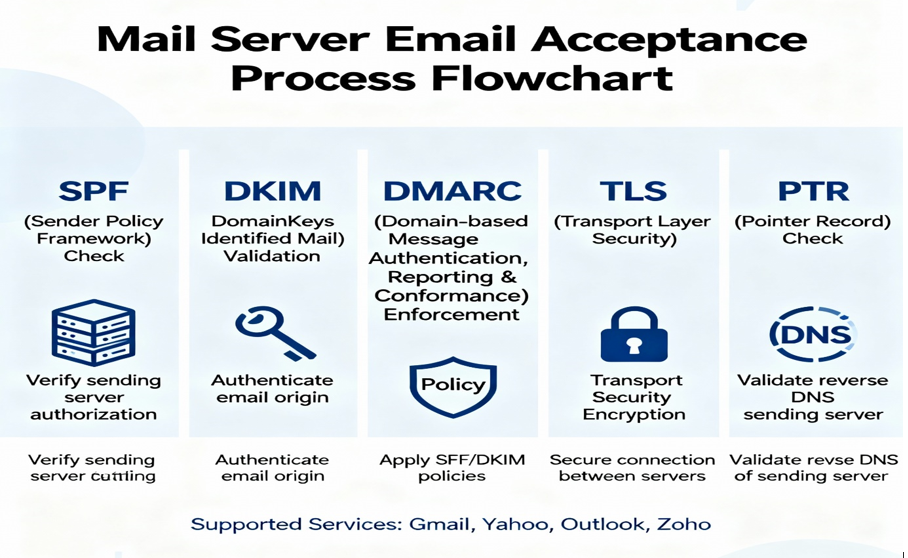
- Checks the sending IP reputation, reverse DNS (PTR) record, and proper HELO/EHLO syntax.
- Verifies if the sending IP appears on public blocklists (e.g., Spamhaus, Barracuda).
- Confirms that the connecting server supports encryption (TLS).
1.2 Envelope and Header Authentication
- Validates SPF, DKIM, and DMARC records.
- Confirms that the “From” and “Return-Path” domains match and are properly aligned.
1.3 Transport Security
- Requires encrypted SMTP sessions (STARTTLS or TLS 1.2+).
- In some cases, validates DNSSEC for added security.
1.4 Policy and Reputation Evaluation
- Evaluates domain and IP reputation, complaint rates, and spam traps.
- Considers engagement factors such as opens, clicks, unsubscribes, and spam complaints.
1.5 Content and Compliance Review
- Runs spam-filtering algorithms (Bayesian and signature-based).
- Checks for unsubscribe headers, CAN-SPAM compliance, and link safety.
If all checks are passed, the mail server issues a “250 OK” response, confirming acceptance.
If one or more checks fail, the message is deferred (4xx) or rejected (5xx) with an SMTP error.
2. Gmail Server Acceptance Criteria
Reference: Gmail Bulk Sender Guidelines
Requirements
- At least one of SPF, DKIM, or DMARC must pass. Gmail prefers all three to be aligned.
- Reverse DNS (PTR) must exist and resolve correctly.
- TLS encryption is required; unencrypted mail may be blocked.
- Gmail throttles email acceptance based on sender reputation and engagement.
- Gmail defines a bulk sender as anyone sending 5,000 or more messages per day to Gmail accounts.
Rejection Triggers
- Missing authentication records.
- Large volume spikes from cold IPs.
- Spam-like content or blacklisted URLs.
- Invalid or missing PTR record.
3. Yahoo Mail Server Acceptance Criteria
Reference: Yahoo Sender Hub | Yahoo Postmaster Blog
Requirements
- SPF or DKIM must pass for sender identity.
- DMARC is mandatory for bulk senders (5,000 or more per day).
- TLS encryption required.
- Participation in Yahoo’s Feedback Loop (FBL) recommended for spam complaint tracking.
Server Behavior
- Uses both domain and IP reputation.
- Requires a valid “List-Unsubscribe” header for marketing or bulk emails.
- Uses engagement-based filtering to determine inbox placement.
Common Deferral or Rejection Codes
- 421 4.7.0 [TS01]: Too many messages. Reduce sending rate.
- 421 4.7.1 [TS03]: Suspicious pattern. Resend gradually.
- 554 5.7.9: Poor reputation. Improve authentication and reduce complaints.
Yahoo no longer provides manual whitelisting. Compliance and consistent sending practices automatically improve deliverability.
4. Outlook / Microsoft Mail Acceptance Criteria
Reference: Microsoft SNDS | Microsoft Sender Requirements
Requirements
- SPF, DKIM, and DMARC must all be configured and aligned (mandatory by May 2025 for senders of 5,000 or more messages per day).
- PTR (reverse DNS) must resolve correctly.
- TLS encryption preferred.
- The “From” domain must match all header domains consistently.
Server Behavior
- Uses SmartScreen and SNDS systems for sender evaluation.
- Monitors IP and domain reputation in real time.
- High complaint or bounce rates can lead to throttling or junk-folder delivery.
Common Error
- 550 5.7.515: Access denied. Sending domain does not meet authentication level.
Usually caused by missing or misaligned DKIM/DMARC authentication.
5. Zoho Mail Server Acceptance Criteria
Reference: Zoho Mail Spam Control Policy | ZeptoMail Deliverability Guide
Requirements
- SPF and DKIM must exist and align.
- DMARC is strongly recommended for better trust and reputation.
- TLS encryption is required.
- Only custom “From” domains are allowed; public domains (e.g., @gmail.com) are rejected.
- Maximum sending limit is about 1,000 outgoing emails per day per account.
Server Behavior
- Authenticates domain ownership before acceptance.
- Blocks large sends from inactive IPs.
- Evaluates sender reputation across Zoho Mail, Zoho Campaigns, and ZeptoMail.
Rejection Triggers
- Missing SPF/DKIM.
- Using public-domain “From” addresses.
- Sending bulk messages from standard Zoho Mail instead of ZeptoMail.
Zoho recommends ZeptoMail or Zoho Campaigns for transactional or marketing emails.
6. AOL Mail (Yahoo Inc.)
Reference: AOL Postmaster
Requirements
- SPF or DKIM must pass.
- DMARC strongly recommended.
- TLS encryption required.
- PTR record required.
- Complaint rate must stay below 0.3%.
Behavior
- Uses Yahoo’s mail infrastructure and deferral codes (TS01–TS04).
- Domain reputation is prioritized over IP reputation.
7. iCloud Mail (Apple Inc.)
Reference: Apple iCloud Mail Postmaster
Requirements
- SPF and DKIM required; DMARC recommended.
- TLS 1.2 or higher required.
- PTR record must resolve correctly.
Behavior
- Rejects mail from untrusted or unauthenticated IPs.
- Uses privacy-first filtering and dynamic throttling to protect inboxes.
8. Proton Mail
Reference: Proton Mail Authentication Guide
Requirements
- SPF, DKIM, and DMARC validation required.
- TLS encryption mandatory.
- “From” domain must be authenticated.
- DNSSEC and DANE supported for additional verification.
Behavior
- Rejects unencrypted or unauthenticated mail.
- Uses a privacy-first reputation and delivery model.
9. Mail.com and GMX Mail (United Internet AG)
Reference: GMX / Mail.com Postmaster Portal
Requirements
- SPF, DKIM, and DMARC must be configured.
- TLS and PTR records required.
- Certified Senders Alliance (CSA) membership recommended for improved acceptance.
Behavior
- Shared reputation between GMX and Mail.com.
- Rate limits unknown IPs (typically around 5,000 messages per day).
- Applies GDPR-compliant filtering.
10. Yandex Mail
Reference: Yandex Postmaster
Requirements
- SPF, DKIM, and DMARC required.
- TLS encryption required.
- PTR record required.
- Domain and IP reputation continuously monitored.
Behavior
- Adjusts reputation in real time based on engagement and complaints.
- Provides complaint feedback loops for sender improvement.
11. Tutanota (Tuta)
Reference: Tutanota Technical Documentation
Requirements
- SPF and DKIM required.
- TLS strictly enforced.
- DMARC optional but recommended.
- PTR record required.
Behavior
- Accepts only encrypted email traffic.
- Rejects all non-TLS connections.
- Does not support complaint feedback loops; relies entirely on authentication trust.
12. Quick Checklist for Email Acceptance
- Configure and align SPF, DKIM, and DMARC records.
- Enable TLS encryption on ports 587 or 465.
- Set valid PTR (reverse DNS) records for all sending IPs.
- Use a “From” domain that matches your authenticated domain.
- Keep complaint rates below 0.3%.
- Avoid using free-domain sender addresses (e.g., @gmail.com, @yahoo.com).
- Increase sending gradually; avoid sudden spikes.
- Add proper unsubscribe headers in marketing messages.
- Monitor Postmaster tools (Google, Microsoft, Yahoo) regularly.
- Review bounce and error logs frequently.
Conclusion
Email acceptance is not random — it is based on authentication, encryption, policy compliance, and reputation.
Mail servers such as Gmail, Yahoo, Outlook, and Zoho only accept messages that meet these standards.
If your sending setup:
- Uses valid SPF, DKIM, DMARC, and PTR records,
- Encrypts transmissions with TLS,
- Maintains a trusted and consistent domain, and
- Follows unsubscribe and sending best practices,
then your messages will be accepted and delivered reliably across all major email platforms.