When setting up domain authentication in SendGrid, there are situations where you may need to authenticate the same domain multiple times—for example, if you’re working with multiple environments (staging, production, etc.) or need separate setups for different teams. Thankfully, SendGrid makes this possible with the Custom DKIM Selector option.
In this guide, we’ll walk you through the process step by step.
What is a DKIM Selector?
A DKIM selector is a string used within your DNS records to differentiate between multiple sets of DKIM keys for the same domain. By customizing the selector, you can generate unique DNS records and authenticate your domain multiple times in SendGrid.
Steps to Authenticate the Same Domain Multiple Times
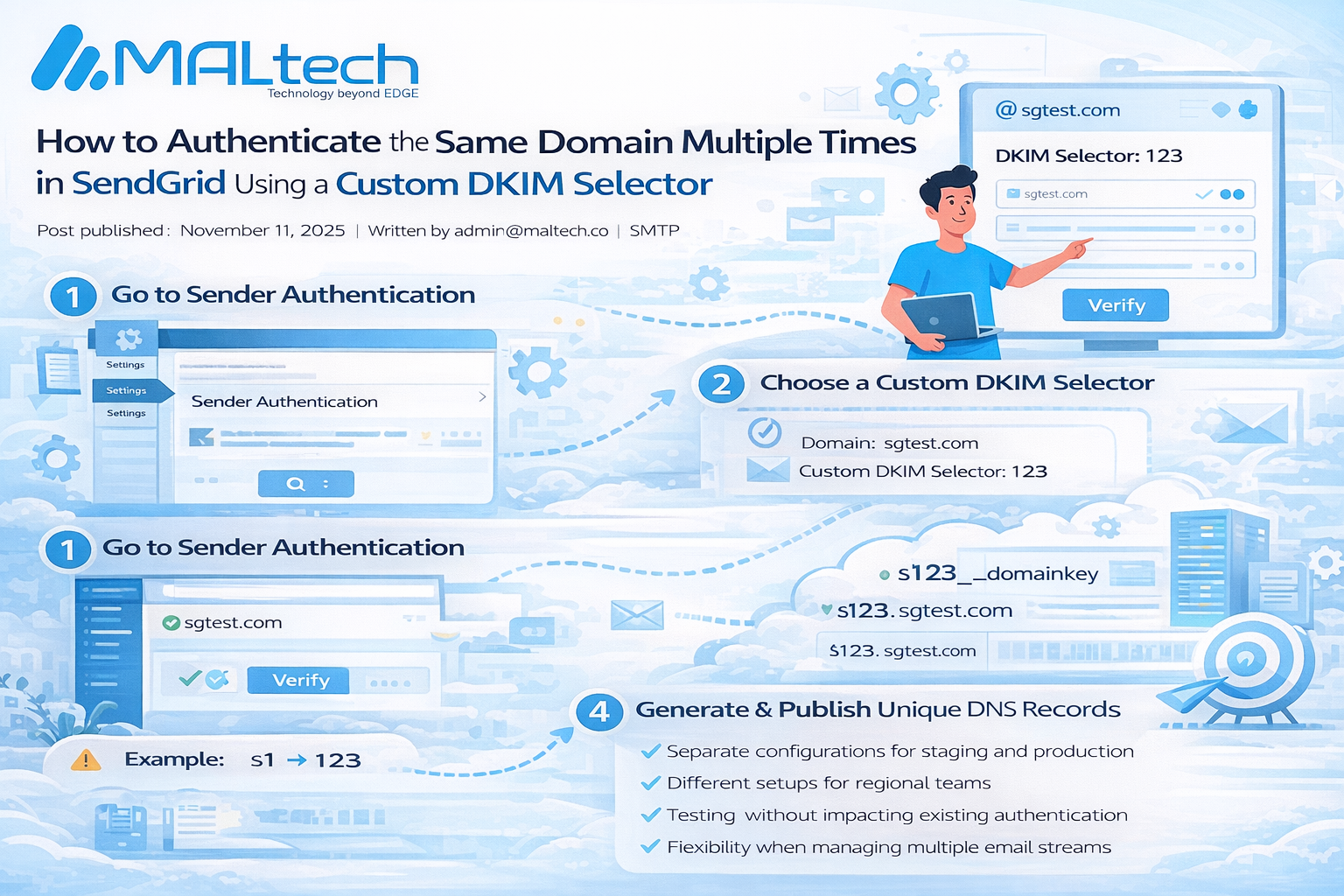
- Go to Sender Authentication in SendGrid
- Navigate to Settings > Sender Authentication in your SendGrid dashboard.
- Navigate to Settings > Sender Authentication in your SendGrid dashboard.
- Start the Domain Authentication Process
- Enter the domain you want to authenticate.
- Enter the domain you want to authenticate.
- Open Advanced Settings
- Expand the Advanced Settings drop-down.
- Check the box for Use a custom DKIM selector.
- Expand the Advanced Settings drop-down.
- Choose a Custom DKIM Selector
- Enter a 3-character string (letters or numbers).
- This will make your new DKIM record unique.
- ⚠️ Make sure the selector is different from your original one.
- Enter a 3-character string (letters or numbers).
- Example:
- Domain: sgtest.com
- Custom DKIM Selector: 123
- Domain: sgtest.com
- Generate Unique DNS Records
- After setting the custom selector, SendGrid will provide a new set of DNS records.
- These records will look similar to your original ones but will be unique due to the custom selector.
- After setting the custom selector, SendGrid will provide a new set of DNS records.
- Publish the DNS Records
- Add the generated TXT and CNAME records to your domain’s DNS provider.
- Add the generated TXT and CNAME records to your domain’s DNS provider.
- Verify and Complete Authentication
- Once DNS propagation is complete, click Verify in SendGrid to finish setup.
- Once DNS propagation is complete, click Verify in SendGrid to finish setup.
Example:
If your original DKIM selector was something like s1, using 123 as your new selector will generate a separate set of records, ensuring SendGrid treats it as a unique authentication.
Why Use Multiple Authentications for the Same Domain?
- Separate configurations for staging and production
- Different setups for regional teams
- Testing without impacting existing authentication
- Flexibility when managing multiple email streams